Canyon 3D Shadow Box Paper Cut SVG
Hello, crafters. If you have ever admired the intricate depth of layered paper art but felt intimidated by the precision required to create it from scratch, you are not alone. Many enthusiasts struggle with the gap between their creative vision and the technical execution needed to bring complex landscapes to life. This is where the Canyon 3D Shadow Box Paper Cut SVG becomes an invaluable resource. It transforms a potentially daunting project into an accessible, rewarding experience that results in a breathtaking work of art.
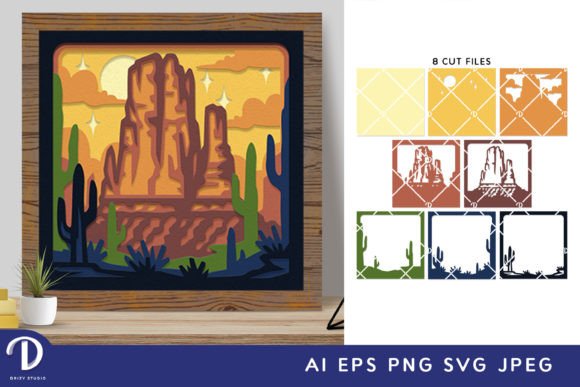
The Canyon Shadow Box is a stunning piece that ingeniously captures the grandeur and mystique of a rugged canyon landscape within a three-dimensional paper-cut diorama. Encased within a carefully crafted wooden frame, this shadow box invites viewers to embark on a visual journey into a world of natural wonder. Whether you are looking to add a unique focal point to your home decor or seeking a meaningful gift for someone who appreciates nature, understanding how to utilize this template effectively can elevate your crafting skills significantly.
Understanding the Template and Its Formats
Before diving into the assembly process, it is crucial to understand what you are receiving. The Canyon 3D Shadow Box Paper Cut SVG is designed to be versatile, ensuring compatibility with various crafting styles and equipment levels. You will receive a beautiful square paper-cutting template available in multiple formats to suit your specific needs:
- SVG (714 x 714 px): The primary vector format, essential for digital cutting machines like Silhouette and Cricut. This file allows for precise cuts and easy resizing while maintaining aspect ratio integrity.
- AI and EPS (714 x 714 px): Ideal for professional designers or those who prefer using Adobe Illustrator for custom modifications before printing.
- PNG (714 x 714 px): A high-resolution raster image suitable for direct printing if you do not have vector editing software.
- JPEG (3000 x 2000 px): A high-quality preview file that provides a clear look at the final design structure.
The inclusion of eight distinct layers ensures that the final product has significant depth and dimensionality. Each layer represents a different plane of the canyon, from the distant horizon to the foreground rocks, creating a realistic sense of scale and perspective when assembled correctly.
Overcoming Common Crafting Challenges
One of the biggest hurdles in paper crafting is achieving clean, accurate cuts, especially with detailed designs. Without the right tools, users often face jagged edges or misaligned pieces, which can ruin the illusion of depth in a shadow box. The Canyon 3D Shadow Box Paper Cut SVG addresses this challenge by providing optimized vector paths. When used with a cutting machine, these paths ensure that every curve and straight line is executed with laser-like precision.
However, not everyone owns a Silhouette or Cricut machine. For those who rely on manual tools, the template remains highly effective. By printing the SVG as a PNG or JPEG onto cardstock, you can use a sharp art knife and a self-healing cutting mat to hand-cut the design. While this requires more patience and a steady hand, the result is equally impressive. The key here is preparation; tracing the printed design onto thicker cardstock can help guide your knife for cleaner lines. Additionally, having double-sided tape or strong glue on hand is non-negotiable for keeping the layers aligned during assembly.
Practical Applications and Creative Outcomes
Once the cutting phase is complete, the real magic begins. The Canyon 3D Shadow Box Paper Cut SVG offers several practical applications that extend beyond simple decoration. Here are some ways you can implement this project:
1. Framed Wall Art
The most straightforward application is creating a framed wall decoration. After assembling the eight layers using spacers (such as small foam squares or strips of cardboard) to maintain distance between them, place the entire stack inside a deep-frame shadow box. This traditional approach highlights the natural colors of the paper and the play of light across the textured surface. It serves as a sophisticated addition to living rooms, offices, or entryways, bringing a touch of the outdoors inside.
2. Illuminated Lightbox
For a more dramatic effect, consider converting your shadow box into a lightbox. By adding LED strip lights around the perimeter or behind the layers, you can transform the canyon scene into a glowing masterpiece. The light filters through the layered paper, emphasizing the contours of the canyon walls and creating a warm, inviting ambiance. This variation is particularly popular for nightstands or as a centerpiece for themed parties and events.
3. Educational and Therapeutic Projects
This project is also excellent for educational purposes or therapeutic activities. Teaching children about geology through the lens of art helps them understand spatial relationships and geological formations. Similarly, the repetitive, focused nature of cutting and assembling the layers can be meditative, offering a screen-free way to relax and engage in mindful creation.
Implementation Tips for Success
To get the best results from the Canyon 3D Shadow Box Paper Cut SVG, consider the following recommendations:
- Material Selection: Use high-quality cardstock, preferably in varying shades of brown, tan, and orange to mimic the natural hues of a canyon. Thicker paper (around 180-240 gsm) holds its shape better and prevents warping.
- Resizing Considerations: While SVG files can be resized, always keep the same aspect ratio. Scaling up too much may cause the delicate details to become too large and lose their structural integrity, while scaling down might make the layers indistinguishable.
- Assembly Order: Always assemble from back to front. Start with the furthest layer (usually the sky or distant mountains) and work your way forward. This ensures that each subsequent layer properly overlaps and hides the mounting hardware of the previous ones.
- Testing Cuts: If using a cutting machine, perform a test cut on scrap paper first. Adjust the blade depth and speed settings according to your machine’s manual and the thickness of your chosen cardstock.
Who Is This For?
This project caters to a wide range of users. Beginners will appreciate the guided structure of the SVG files, which remove the guesswork from design. Intermediate crafters can experiment with different color palettes and lighting techniques to personalize their output. Advanced artists might use the AI or EPS files as a base for further customization, adding extra layers or modifying the landscape to reflect a specific canyon they love.
In conclusion, the Canyon 3D Shadow Box Paper Cut SVG is more than just a template; it is a gateway to creating a tangible piece of art that celebrates natural beauty. By leveraging the right tools and techniques, whether digital cutting machines or manual precision, you can overcome common crafting challenges and produce a stunning 3D shadow box. Whether displayed as a static frame or illuminated as a lightbox, this project offers a fulfilling creative outlet and a beautiful decorative element for any space.