The Magic of Layered Paper Crafts: Mastering the 3D Christmas Gnome Set
The holiday season brings with it a unique blend of nostalgia, creativity, and the desire to make our homes feel warm and inviting. For craft enthusiasts, this time of year is not just about decorating; it is about creating memories through tangible, handmade items. Among the myriad of crafting trends that have gained popularity in recent years, 3D paper crafts have emerged as a standout favorite. Specifically, the 3D Christmas Gnome design has become a staple for hobbyists who wish to add a whimsical, dimensional touch to their festive decor.
However, achieving a professional-looking 3D effect requires more than just a single image file. It demands precision, layering, and high-quality digital assets. This article explores the intricacies of working with a comprehensive 3D Christmas Gnome Set, detailing what you get, how these files function, and why they are an essential addition to your digital crafting library.
Understanding the Anatomy of a 3D Paper Craft
Before diving into the specifics of the product, it is crucial to understand what makes a "3D" cut file different from a standard flat design. In traditional paper crafting, you might cut out a silhouette of a gnome and glue it directly onto a background. While charming, this lacks depth.
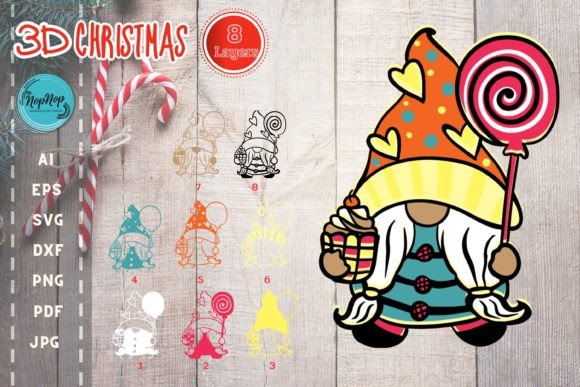
A true 3D Christmas Gnome relies on the principle of layering. Imagine a snow globe or a pop-up card. To create that illusion of depth, the design is split into multiple distinct layers. Each layer represents a different part of the gnome—perhaps the hat, the beard, the nose, the body, and the accessories like candy canes or gifts. When these layers are cut separately and stacked upon one another with small spacers (or adhered at specific points), they create a three-dimensional object that stands up and catches the light beautifully.
This technique transforms a simple graphic into a sculptural piece of art. It allows for shadows and highlights to play across the figure, giving it life and character. The complexity lies in the alignment; if one layer is slightly off-center, the entire illusion breaks. This is where high-quality, perfectly aligned cut files become indispensable.
What’s Inside the Digital Download?
When you purchase a premium 3D Christmas Gnome Set, you are investing in a complete workflow solution. A well-designed package saves hours of troubleshooting and ensures compatibility across various software platforms. Let’s break down exactly what you will receive in your download package.
The Folder Structure and File Counts
You will receive a single zip file containing 7 folders. Each folder corresponds to one of the 8 layers required to build the gnome. This organization is critical because it keeps your workspace tidy and ensures you know exactly which file belongs to which part of the design. Additionally, there is often a sample file included in each category to help you test your machine settings before committing to expensive materials.
Here is a detailed breakdown of the contents:
- DXF Files: 8 DXF files, plus 1 sample file. DXF is a universal format widely used by older cutting machines and vector software.
- AI Files: 8 AI files, plus 1 sample file. These are ideal for users of Adobe Illustrator who need to edit paths or colors.
- EPS Files: 8 EPS files, plus 1 sample file. EPS offers high compatibility for professional printing and vector editing.
- SVG Files: 9 SVG files, plus 1 sample file. SVG (Scalable Vector Graphics) is the most popular format for modern electronic cutting machines like Cricut and Silhouette.
- PDF Files: 9 PDF files, plus 1 sample file. PDFs are excellent for laser cutters or for viewing the design without specialized vector software.
- JPG Files: 9 JPG files, plus 1 sample file. These raster images are useful for visual reference or for printers that accept JPEG inputs.
- PNG Files: 9 PNG files, plus 1 sample file. PNGs preserve transparency, making them handy for digital design mockups.
Note that while the structure mentions 7 folders for 8 layers, this typically implies that some layers might be grouped logically (e.g., base layers vs. decorative elements) or that the numbering system accounts for a master assembly file within the count. Regardless, the total volume of files ensures you have every angle and component covered.
Technical Specifications: Quality Matters
The artwork size is specified as 8.5″ x 11″, which aligns perfectly with standard letter-sized paper and cardstock. This is significant because it means you do not need to scale the design up or down, which can sometimes distort fine details. Furthermore, the resolution is set at a high quality 300 dpi for the raster formats (JPG/PNG). For vector formats (SVG/DXF/AI/EPS), the resolution is infinite, meaning you can resize them to any dimension without losing clarity.
This high standard is vital for 3D crafts. Thin lines representing the delicate edges of a gnome’s hat or the texture of his beard must be crisp. If the line weight is too thick, the layers will overlap incorrectly. If it is too thin, the cutting machine blade might struggle to cut through cardstock cleanly, leading to ragged edges.
How Does It Work? Compatibility and Usage
One of the most common questions beginners ask is, "Will this work with my machine?" The answer is generally yes, provided your machine supports standard vector or raster formats.
Cutting Machine Compatibility
This cut file is compatible with any cutting machine that supports SVG, PNG, EPS, or DXF file formats. This includes popular brands such as:
- Cricut: Users should primarily use the SVG files. Import them into Cricut Design Space, and the machine will read the cut lines accurately.
- Silhouette Cameo: Like Cricut, Silhouette machines handle SVG files natively. They also support DXF and AI files directly in Silhouette Studio.
- Laser Cutters: If you own a CO2 laser cutter, the PDF, DXF, and SVG files are perfect. Lasers follow vector paths with extreme precision, often producing cleaner results than physical blades for intricate 3D layers.
- Print and Cut: For those without a cutting machine, the JPG and PNG files allow you to print the layers on colored cardstock and cut them out manually with scissors or a craft knife. This is slower but yields beautiful results.
The Hand-Drawn Advantage
A key selling point of this specific design is that it features original, hand-drawn artwork. In the world of digital crafting, many designs are traced from photographs or generated by algorithms. While functional, these can sometimes look stiff or unnatural. A hand-drawn origin means the curves of the gnome’s smile, the fluffiness of the beard, and the tilt of the hat have been crafted by a human artist’s eye.
This artistic touch has been perfected to cut super smoothly in your cutting machine. This means the vector paths have been optimized to remove unnecessary nodes and anchor points. Clean code translates to clean cuts. You won’t find your machine stopping and starting unnecessarily, which reduces wear on your blades and ensures a faster production time.
Why Choose a 3D Gnome Set?
In the realm of holiday decor, personalization is king. Store-bought ornaments are mass-produced and lack soul. By using a 3D Christmas Gnome Set, you take control of the aesthetic.
Creative Versatility
Because you receive all the layers, you are not limited to the default color scheme. You can experiment with different cardstock textures and colors. Want a rustic look? Use kraft paper and burlap accents. Going for a modern vibe? Stick to monochrome whites and greys with silver foil accents. The giftbox and candy elements mentioned in the design description offer additional opportunities for customization. You can attach these gnomes to gift boxes, hang them from the Christmas tree, or display them on mantels.
Educational Value for Hobbyists
Working with multi-layer files is also an educational experience. It teaches patience and precision. Beginners learn how to manage file hierarchy in their software, how to adjust blade pressure for different cardstock weights, and how to assemble complex structures. It elevates the craft from simple cutting to engineering and design.
Important Note on Digital Downloads
As with all digital products, it is important to remember that these files are for digital download only. No physical item will be shipped to your address. Upon purchase, you will receive immediate access to the zip file. Ensure you have enough storage space on your computer or cloud drive to save the archive.
Additionally, please respect intellectual property rights. These files are intended for personal use or small-scale commercial sales of finished physical items (depending on the license terms provided by the creator). You cannot resell the digital files themselves or claim the artwork as your own.
Conclusion
The 3D Christmas Gnome Set is more than just a collection of lines and shapes; it is a toolkit for creativity. With its comprehensive file formats, high-resolution specifications, and hand-drawn charm, it provides everything you need to create stunning, dimensional holiday decorations. Whether you are a seasoned pro looking to expand your portfolio or a beginner eager to try your first 3D project, this set offers a seamless and enjoyable crafting experience.
By understanding the layers, utilizing the correct file types for your machine, and appreciating the artistry behind the design, you can bring a touch of magic to your home this Christmas. So, grab your cardstock, charge your cutting machine, and get ready to assemble your very own 3D Christmas Gnome.