3D Box Templates for Cutting Machines
At first glance, a digital file might seem like the least tangible part of a physical craft project. However, in the world of modern fabrication, the quality of that digital blueprint determines the success of the final product. 3D Box Templates for Cutting Machines represent a bridge between abstract design and tangible reality. These are not merely flat shapes; they are intricate mathematical maps encoded in vector formats, designed to be interpreted by precision tools like Cricut, Silhouette, or laser cutters.
Understanding how these templates work—and why they matter—requires looking beyond the simple act of cutting paper. It involves recognizing the shift from manual drafting to automated precision, a shift that impacts everyone from weekend hobbyists to professional packaging designers. The core value lies in the ability to create complex, interlocking structures without the need for ruler-and-compass geometry skills, democratizing high-quality box making for a wide audience.
What Are 3D Box Templates?
A 3D box template is a vector-based design file that contains specific lines indicating where material should be cut versus where it should be scored (folded). Unlike traditional two-dimensional patterns that require you to calculate angles and margins manually, these templates come pre-configured with tabs, flaps, and structural integrity features. When loaded into compatible software, the machine reads these lines and executes them with sub-millimeter accuracy.
The term "vector" is crucial here. Vector files, such as SVG (Scalable Vector Graphics), EPS (Encapsulated PostScript), or DXF (Drawing Exchange Format), use mathematical equations to define lines rather than pixels. This means the design can be resized infinitely without losing quality. Whether you are crafting a tiny jewelry box or a large shipping crate, the edges remain crisp. This technical foundation is what allows for the versatility seen in today’s digital craft market.
Why Different Audiences Care
The appeal of these templates varies significantly depending on who is holding the tool. For a beginner, the primary draw is accessibility. Creating a sturdy, geometrically correct box by hand is intimidating. A well-designed template removes the fear of failure, allowing new users to focus on decoration and assembly rather than engineering. It provides immediate gratification and builds confidence.
For professionals and small business owners, the priority shifts to efficiency and consistency. If you are selling handmade candles, soaps, or gourmet foods, your packaging is a critical part of your brand identity. Using standardized templates ensures that every single package looks identical, reinforcing professionalism. Furthermore, the ability to quickly iterate designs allows entrepreneurs to test different sizes and styles without investing weeks in prototyping.
Ease of Use vs. Customization
One of the most important factors when evaluating these resources is the balance between ease of use and customization potential. Some templates are "plug-and-play," requiring minimal adjustment. These are ideal for quick projects or those with limited time. However, more advanced users may look for templates that allow for easy modification of dimensions. Good templates often include editable layers or clear instructions on how to scale elements, giving the user control over the final output while maintaining structural logic.
Practical Applications Across Industries
The utility of Box Templates Cut Files extends far beyond simple storage. Let’s look at how different groups utilize these assets in practical scenarios.
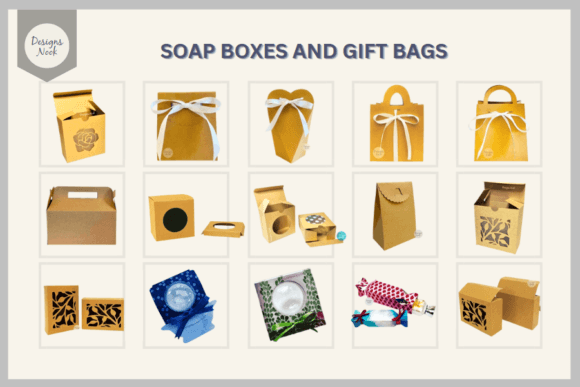
- Hobbyists and Crafters: They often use these templates for gift-giving occasions. Imagine creating a custom-sized box for a set of homemade ornaments or a unique container for wedding favors. The ability to choose from various shapes—hexagonal, cylindrical, or standard rectangular—adds a creative flair that plain store-bought boxes lack.
- Educators: In STEM (Science, Technology, Engineering, and Mathematics) classrooms, these templates serve as excellent teaching aids. Students can learn about geometry, spatial reasoning, and manufacturing processes by assembling 3D structures from 2D plans. It turns abstract math concepts into physical objects.
- Event Planners: For weddings and corporate events, branded packaging is essential. Event planners can use these templates to create custom favor boxes that match the event’s theme perfectly. The speed of digital production means last-minute changes to quantities or sizes are manageable.
- Publishers and Marketers: Book publishers or marketing agencies might use these templates to create promotional mailers. Instead of generic envelopes, they can send out intricate, pop-up style boxes that stand out in the mailbox, increasing engagement rates.
Evaluating Quality and File Formats
Not all digital templates are created equal. When selecting a SVG Vector Boxes Instant download pattern template, buyers should consider several key metrics to ensure they get value for their money.
File Format Compatibility
The format dictates which machines can use the file. SVG is the most common format for home cutting machines like Cricut and Silhouette. It is widely supported and easy to edit in free software like Inkscape. However, if you are working with a laser cutter, you might need an AI (Adobe Illustrator) or DXF file. Always check the individual listing specifications to ensure the file type matches your equipment. Using incompatible formats can lead to wasted material and frustration.
Structural Integrity and Scoring
A visually appealing design is useless if the box falls apart. High-quality templates include precise scoring lines that are distinct from cut lines. In many vector programs, these are represented by different colors or line weights. Look for templates that clearly distinguish between cuts, scores, and perhaps even engraving lines. Additionally, the placement of tabs—the small flaps that hold the box together—is critical. Well-designed tabs are positioned to maximize glue surface area and minimize visibility once assembled.
Material Flexibility
Versatility is a major benefit of these templates. While often associated with cardstock, they can be used with a variety of materials including foam board, thin wood, acrylic, and fabric. The template design must account for the thickness of the material being used. Thicker materials require larger tab allowances and wider score lines to prevent cracking. Experienced users often adjust these parameters, but starting with a robust template makes this process much smoother.
Long-Term Value and Creativity
Investing in a library of Box Templates Laser Cut Files offers long-term benefits. Unlike buying pre-made boxes, which have a one-time use, digital files can be reused indefinitely. You can print the same design on different days, using different colors or textures each time. This encourages experimentation. You might start with a basic square box and gradually explore more complex geometries, expanding your skill set over time.
Moreover, the community aspect cannot be ignored. Many creators share tips on how to assemble difficult designs or suggest material pairings. Engaging with these resources often leads to discovering new techniques, such as layering different colored papers or adding transparent windows for display purposes. This iterative learning process keeps the hobby fresh and engaging.
Conclusion
Whether you are looking to streamline your small business packaging, enhance your classroom lessons, or simply enjoy a rewarding creative project, 3D Box Templates for Cutting Machines provide a powerful solution. They transform the daunting task of box construction into an accessible, precise, and highly customizable activity. By understanding the nuances of file formats, structural design, and material compatibility, you can make informed choices that align with your specific needs. As technology continues to evolve, these digital assets will remain a fundamental tool for anyone looking to bring three-dimensional ideas to life with precision and creativity.