Dragon Silhouette 3D Shadow Box
Creating intricate, multi-dimensional art at home used to require years of practice with precision cutting tools and a steady hand. Today, digital templates have democratized this craft, allowing anyone to produce stunning visual effects without the steep learning curve. The Dragon Silhouette 3D Shadow Box is a prime example of how modern design meets traditional paper art. By layering cut-out shapes, you create depth, perspective, and a dramatic visual impact that transforms flat paper into a three-dimensional scene.
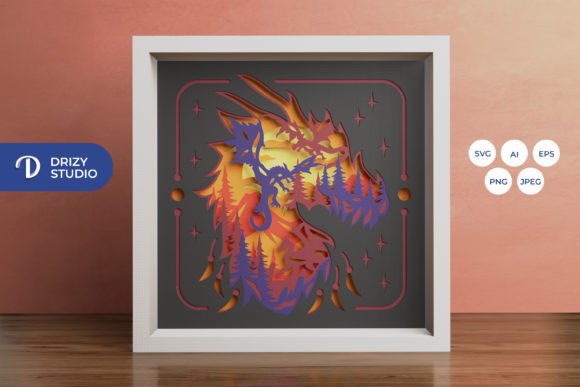
This specific design, often referred to as the Flying Dragon 3D SVG, features a dynamic composition where a dragon appears to soar through space. The magic lies in the separation of elements. When you stack the layers correctly, the negative space between them creates shadows and highlights, giving the illusion that the dragon is hovering above the background. It is not just a picture; it is an experience that changes depending on the viewing angle and lighting.
What Makes This Template Special?
At its core, the Dragon Silhouette 3D Shadow Box is a layered, square paper-cutting template designed for maximum aesthetic impact. Unlike standard single-layer stencils, this project relies on six distinct layers. Each layer serves a specific purpose in building the overall image, from the deep background sky to the foreground details of the dragon’s claws and wings.
The design is optimized for a final assembled size of 20.32 × 20.32 cm (approximately 8 × 8 inches). This square format is highly versatile, fitting perfectly into standard shadow box frames available at most craft stores or online retailers. The symmetry of the square frame also helps balance the chaotic energy of a flying dragon, creating a harmonious piece of wall art.
One of the most appealing aspects of this template is its accessibility. You do not need to be a professional illustrator to use it. The file comes pre-formatted with precise coordinates and curves, ensuring that even if your cutting skills are still developing, the final result will look polished and professional. The focus shifts from "drawing" to "assembling," which is a rewarding process for hobbyists who enjoy tactile creativity.
File Formats and Technical Specifications
When you purchase the Dragon Silhouette 3D Shadow Box, you are receiving a comprehensive package designed to work with various tools and skill levels. The inclusion of multiple file formats ensures compatibility regardless of your preferred workflow:
- SVG (714 x 714 px): This is the primary file type for digital cutting machines like Cricut and Silhouette. It allows for infinite scalability while maintaining crisp edges.
- PNG (714 x 714 px): A high-resolution raster image useful for printing if you prefer manual cutting or need a reference guide.
- AI and EPS (714 x 714 px): Vector files compatible with Adobe Illustrator and other vector graphics software, ideal for professionals who wish to modify colors or add custom text before cutting.
- JPEG (3000 x 2000 px): A high-quality product preview image for quick viewing on any device.
It is important to note that while SVG files can be resized within your cutting software, you must maintain the same aspect ratio to ensure the layers align correctly. Distorting the width or height independently will cause the layers to misalign, ruining the 3D effect.
How to Use the Dragon Silhouette 3D Shadow Box
Using this template is straightforward, but attention to detail is key. Whether you are using a machine or hand tools, the process involves three main stages: cutting, assembling, and finishing.
Cutting Your Layers
If you own a cutting machine such as a Cricut Maker or Silhouette Cameo, loading the SVG file is simple. Import the file into your design software, set the blade depth appropriately for your chosen paper weight, and send the job to the cutter. For those without machines, the PNG or JPEG previews serve as excellent guides. You can print these images, tape them to your workspace, and trace the outlines onto your paper using an art knife and scissors.
For best results, use cardstock rather than standard printer paper. Cardstock holds its shape better and provides enough stiffness to support the weight of upper layers without sagging. A weight between 65 lb and 110 lb is typically recommended for this type of project.
Assembly and Alignment
Once all six layers are cut, the assembly begins. This is where the "shadow box" effect comes to life. You will need glue or double-sided tape to secure the layers. Start with the back layer (usually the darkest background) and place it in your frame. Then, apply adhesive spacers—such as small pieces of foam tape or even folded paper—to elevate the next layer slightly off the previous one. Repeat this process for all layers.
Proper alignment is crucial. Most templates include registration marks or corner guides. Ensure that each layer is centered relative to the others. If the layers are crooked, the dragon may appear to be leaning or floating unevenly. Patience during this step pays off in the final presentation.
Creative Applications and Gifting Ideas
The Dragon Silhouette 3D Shadow Box is more than just a static decoration; it is a customizable project that can adapt to various themes and occasions.
Lightbox Variations
While the traditional version uses ambient light, many creators enhance the design by adding LED strip lights behind the back layer or between specific layers. This turns the shadow box into a glowing lightbox. The translucent quality of some papers can create a beautiful diffusion effect, making the dragon appear as if it is emerging from a magical cloud. This variation is particularly popular for children’s rooms, gaming setups, or office decor.
Personalized Gifts
Because the design is digital, you can easily customize the color scheme to match the recipient’s preferences. Instead of traditional reds and blacks, consider using pastels for a softer look, or metallic foils for a luxurious feel. The Dragon Silhouette 3D Shadow Box makes a thoughtful gift for friends, family, or colleagues who appreciate unique, handmade items. It shows effort and creativity, qualities that mass-produced gifts often lack.
Educational and Professional Uses
Educators can use this project to teach principles of geometry, spatial reasoning, and artistic composition. Students learn how breaking a complex image into simpler parts aids in understanding structure. Meanwhile, marketers and bloggers might find value in creating similar content for their audiences, showcasing DIY tutorials or sharing the finished product as engaging social media content.
Important Considerations Before You Start
Before diving into your first build, keep a few practical tips in mind to ensure a smooth experience.
First, always test your cuts on scrap paper before committing to your final colored cardstock. This helps you identify any potential issues with blade pressure or alignment early on. Second, be mindful of the final product's appearance. As noted in the product details, images are for preview purposes only. The final color may vary slightly due to lighting sources and the specific brand or hue of paper you choose. Natural daylight often reveals true colors, while warm indoor lighting can shift tones.
Finally, remember that this is a creative process. Do not worry about perfectionism. Minor imperfections in cutting or gluing can add character to the piece. The goal is to enjoy the creation process and display a unique piece of art that reflects your personal touch. With the Dragon Silhouette 3D Shadow Box – Flying Dragon 3D SVG, you have all the tools needed to bring a mythical creature to life on your wall. Get started today and transform simple sheets of paper into a captivating 3D masterpiece.